Arc Raiders DLSS, FSR, and Frame Generation Settings: Full Frame Gen Guide
Updated Published
On this page
Arc Raiders can gain a lot from upscaling, but the wrong mode can make the game look softer or feel worse than the extra FPS is worth. This guide helps you choose the best DLSS, FSR, and frame generation settings based on hardware tier and competitive priorities.
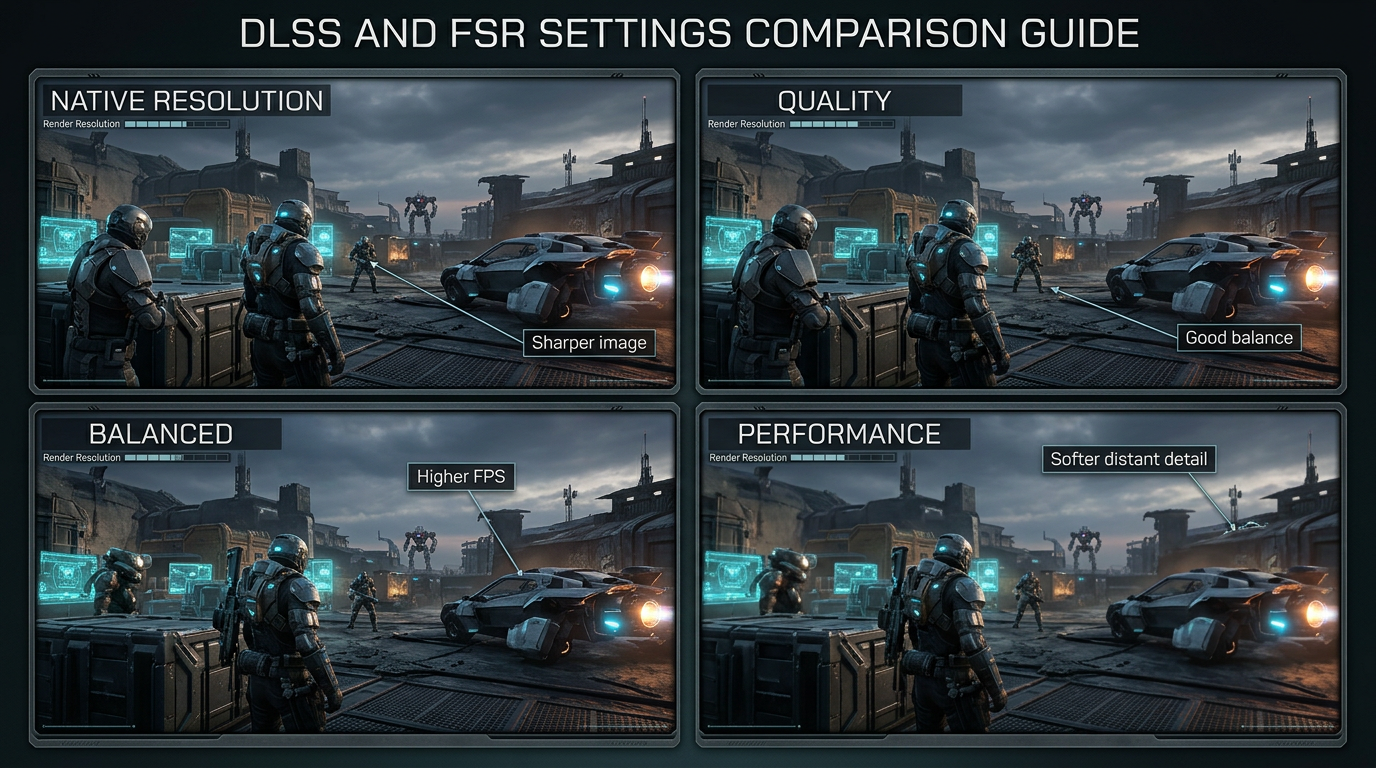
More FPS is useful only if the image stays readable and the game still feels responsive.
Best starting point for most players
If Arc Raiders offers multiple upscaling options, this is the safest starting setup:
| Setting | Recommendation |
|---|---|
| Upscaling | DLSS or FSR |
| Preset | Quality |
| Sharpening | Low to Moderate |
| Frame Generation | Off at first, then test |
| V-Sync | Off |
| Frame Cap | Slightly below monitor refresh if needed |
The Quality preset is usually the best balance between image clarity and performance. Move to Balanced only if you genuinely need more FPS in heavy areas.
Native vs Quality vs Balanced vs Performance
Native
Use native resolution if your GPU already gives you stable performance and clean frame pacing. It usually delivers the sharpest image, but it is not always the best choice if big fights cause drops.
Quality
This is the best preset for most players. It keeps the image cleaner than more aggressive modes while still giving a meaningful FPS gain.
Balanced
Balanced makes sense when native or Quality still feels too heavy. It is a practical middle ground for mid-range GPUs, especially at higher resolutions.
Performance
Use this only when you need every extra frame and you are willing to accept softer distant detail. In a visibility-heavy shooter, too much softness can hurt target tracking.
Should you use frame generation in Arc Raiders?
Frame generation in Arc Raiders can boost displayed frame rate, but it is not automatically the best competitive option. Frame gen inserts interpolated frames between real ones, so the counter goes up while your actual input rate stays the same.
DLSS Frame Generation (NVIDIA)
DLSS Frame Generation requires an RTX 40-series or newer GPU. If you have one:
- enable NVIDIA Reflex alongside frame gen — it claws back most of the added latency
- aim for a 60+ FPS base before turning frame gen on; interpolating from low FPS looks and feels bad
- keep V-Sync off in-game and let Reflex manage frame delivery
AMD FSR 3 frame generation in Arc Raiders
FSR frame generation is vendor-agnostic, so AMD FSR 3 frame gen also runs on older NVIDIA and Intel GPUs:
- pair it with FSR Quality upscaling rather than aggressive presets
- enable Radeon Anti-Lag in Adrenalin on AMD cards to offset interpolation latency
- the same 60 FPS base rule applies — frame gen amplifies smoothness, it cannot create it
Use it when
- your base FPS is already decent
- you want smoother motion on a high-refresh display
- the input feel still seems acceptable after testing
Avoid it when
- your base FPS is already too low
- you care more about raw responsiveness than visual smoothness
- the image gets too artifact-heavy in motion
If your priority is competitive feel first, test with frame generation off before turning it on.
Best settings by hardware tier
Entry-level or older GPUs
- use
Balancedbefore dropping toPerformance - lower shadows and effects first
- keep sharpening conservative so the image does not look harsh
Mid-range GPUs
- start with
Quality - move to
Balancedonly if raids still feel unstable - keep view distance high if possible for visibility
High-end GPUs
- test native first
- use
Qualityif you want better 1% lows or higher refresh headroom - do not assume frame generation is necessary for competitive play
Upscaling and visibility
The wrong upscaling mode can make distant enemies harder to read. That is why you should judge these settings in live combat scenes, not just in menus.
Pay attention to:
- edge clarity on distant targets
- foliage and environmental detail
- how easy it is to track movement while turning
- whether the image becomes too soft in motion
For more visibility-focused advice, read Arc Raiders Best Visibility Settings for Competitive Play.
Upscaling and input feel
Higher FPS does not always mean lower input delay in the way the game feels to you. Frame generation especially can change the feel of mouse or controller response.
If the game looks smoother but aiming feels less direct:
- turn frame generation off
- keep upscaling on
Quality - cap FPS more sensibly
- disable V-Sync
Then compare again. If the game feels heavy overall, pair this with Arc Raiders Stuttering Fix: Stop FPS Drops and Frame Time Spikes on PC. System-level frame consistency also matters here — The Ultimate Guide to Timer Resolution for Gaming explains the Windows side, and the best NVIDIA Control Panel settings keep driver overrides from fighting your in-game choices.
Recommended combinations
Best competitive balance
- Upscaling:
Quality - Frame Generation:
Off - V-Sync:
Off - Shadows and Effects:
Low
Best for weaker PCs
- Upscaling:
Balanced - Frame Generation:
Offat first - Texture Quality: reduced if VRAM is tight
- Post Processing:
Low
Best for high-refresh smoothness
- Upscaling:
Quality - Frame Generation:
Ononly if base FPS is already strong - Frame Cap: tuned to your display
Related guides
- Arc Raiders Best Visibility Settings for Competitive Play
- Arc Raiders Stuttering Fix: Stop FPS Drops and Frame Time Spikes on PC
- Arc Raiders Optimization Guide: Best Settings for Maximum FPS and Performance
- Best GPU Overclock Guide for Gaming
The best Arc Raiders DLSS and FSR setup usually starts with Quality, not the most aggressive preset. Prioritize a clean image and stable feel first, then test frame generation only if it improves smoothness without making the game harder to read or control. Frame gen is a smoothness tool for strong systems, not a rescue option for weak ones.
Frequently asked questions
Should I use frame generation in Arc Raiders?
Only if your base FPS is already 60+ and you play on a high-refresh display. Frame gen adds visual smoothness but not responsiveness, so competitive players who prioritize input feel should test with it off first.
What are the best DLSS frame generation settings for Arc Raiders?
DLSS Quality upscaling, frame generation on only if base FPS is strong, NVIDIA Reflex enabled, and V-Sync off. DLSS Frame Generation requires an RTX 40-series or newer GPU.
Does Arc Raiders support AMD FSR 3 frame generation?
Yes — FSR frame generation works on a wide range of GPUs, not just AMD cards. Pair it with FSR Quality upscaling and enable Anti-Lag in Adrenalin to offset the added latency.
Does frame gen add input lag in Arc Raiders?
Yes, a small amount — generated frames are interpolated, so your real input rate does not increase. Enabling Reflex (NVIDIA) or Anti-Lag (AMD) recovers most of that latency.
Is DLSS or FSR better in Arc Raiders?
On an RTX card, DLSS gives the cleaner image, especially in motion. On AMD, Intel, or older NVIDIA GPUs, FSR is the right pick because it runs on any hardware and its recent versions look close.